



Every line, in its own time.
Lyrics a little early or late? Shift a line or the whole song by the amount you choose. Find the timing that feels right.
 floating lyrics.Try free for 14 days
YOUR MUSIC HAS MORE TO SAY
Some songs deserve your full attention.
Beautiful, floating lyrics that move with your music. Right on your Windows desktop.
14 days. Every feature. No card. No automatic charge.
Free checkout & download through Polar · Download details
Take a closer lookPress play. Drag the timeline. Make it yours. No audio in this preview.
AT HOME WITH YOUR FAVORITE PLAYER
Or open a song directly in Floating Lyrics. Your collection, your choice.
A WINDOW INTO YOUR MUSIC
Lyrics flow with the song, one line at a time. When you look away, the controls disappear. Just the words, right where you want them.
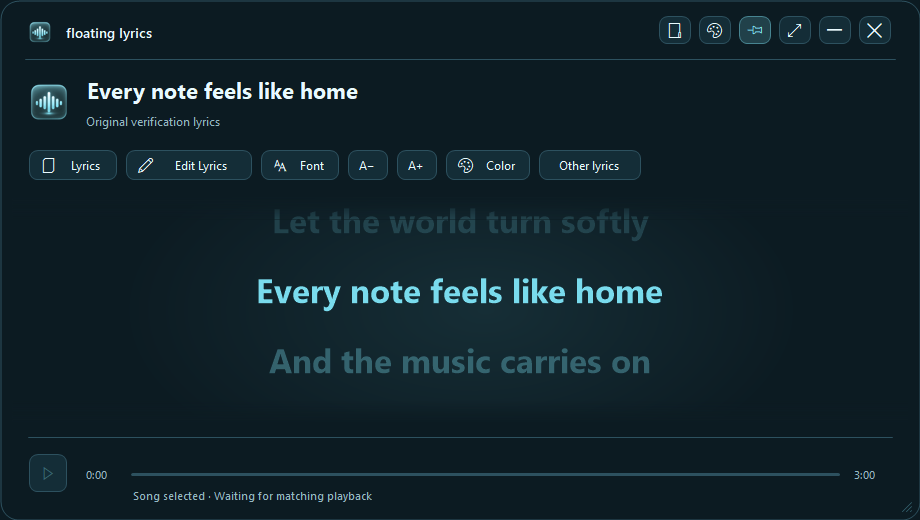
Window controls
Lyric tools
Playback
Lyrics a little early or late? Shift a line or the whole song by the amount you choose. Find the timing that feels right.
Fix a word. Add a missing line. Or create synchronized lyrics from scratch: listen, stamp the time, and move to the next line.
Load LRC files from your music folder and save your corrections beside each song. Your lyrics stay with your collection.
A LITTLE EDIT. A PERFECT MOMENT.
Fix a lyric. Bring a whole song into sync. Or turn a page of words into synchronized lyrics, one line at a time.
Meet the lyrics editor. Hover, tap, or focus a control to learn what it does.
Paste lyrics with one line per row. Select the first line and enable Stamp & advance.
Press Ctrl+T as each line begins · Ctrl+S saves completed lyrics · Ctrl+Z undoes an edit.
Lyrics appear late? Use Earlier. Appear too soon? Use Later. Save keeps your changes.
Correct existing lyrics, or paste your own with one line per row.
Enable Stamp & advance. Press Ctrl + T as each line begins.
Save the finished LRC beside your song, ready for the next listen.
LESS SETUP. MORE LISTENING.
One installer brings it all together. Use Floating Lyrics on its own, or let your player bring the lyrics to you.
Install Floating Lyrics and choose the integrations for the players you already use.
Open a local song in a connected player, or choose it directly in Floating Lyrics.
The app looks for matching lyrics. When synchronized lyrics are available, they flow with your song.
ONE APP. ALL THE WORDS.
Rediscover the albums, deep cuts, and songs you know by heart. A small addition to your desktop. A little more connection to your music.
See what happens after purchaseIncluding applicable VAT. Up to 2 activated PCs.
All five integrations in one bundle.
YOUR MUSIC. TWO WEEKS TO FALL IN LOVE.
Try the complete app for 14 days. Choose your players, fine-tune the lyrics, and make your desktop feel like you.
Version 0.2.1 · 337.6 MB
Windows 10 (2004+) & Windows 11 · 64-bit
Continue to Polar’s free checkout with your email, then download FloatingLyrics-Bundle-Setup.exe from your customer page. Keep the confirmation email for access to your download.
One bundle. Install the standalone app and the integrations you want. Your media player must already be installed.
After 14 days, purchase a license to continue. No automatic charge. Enter your key in the same app to unlock it.
The installer is currently unsigned. Windows may show an unknown-publisher or SmartScreen warning. If you downloaded it through our official website’s Polar link and have verified that the checksum matches, you can select More info → Run anyway to continue. If that option is unavailable, or a warning identifies a specific threat, contact support before proceeding.
Expected SHA-256 checksum:
77f4df5c5f687ac350537d9c31b7217589763a4bef4956ed3dd3a0e17401d551FROM CHECKOUT TO YOUR FIRST SONG
Your purchase includes the Windows bundle and a license key. Everything you need is kept together in your Polar purchase page.
Buy through Polar’s hosted checkout. Check the final total, then keep your order email for access to your purchase.
Download FloatingLyrics-Bundle-Setup.exe from your purchase page. Already using the trial? Keep your existing installation, settings and lyrics.
Copy your key from Polar. In Floating Lyrics, right-click and choose License & activation…, then Enter license key. Activate on up to two PCs.
chrismpo1980@gmail.comFor purchase questions, include your order number and checkout email. Never send your full license key or payment-card details.
€14.99 once, including applicable VAT, for the complete app on up to two activated PCs. Future updates, including major versions, are included. There is no recurring subscription.
Initial activation requires internet. Activated paid licenses work offline without a time limit. The app rechecks when connected; failed connections do not interrupt paid access. Confirmed invalid licenses or activations are blocked. Use Deactivate this PC before moving your license. Separate Windows accounts can consume separate activation slots.
Polar is the merchant of record and processes your payment. For a refund request, email Floating Lyrics support with your order number and the reason for your request.
Requests are reviewed in accordance with applicable consumer rights and the purchase terms presented at checkout. Your statutory rights are not affected. Read Polar’s purchase terms.
This website has no added advertising pixels, analytics scripts, or signup forms. Its hosting provider processes the technical information needed to serve the site. Free-trial and paid checkouts take place on Polar, which collects the information needed to provide your download or purchase, under Polar’s privacy policy.
The Windows app stores preferences, lyrics and encrypted trial/license records locally. Licensing sends your key and a hashed device identifier to Polar. Online lyric searches send song information to lyric providers. Trial/license records remain after uninstall so reinstalling does not restart the trial. Contact support for help removing them or with privacy requests.
A FEW GOOD QUESTIONS